

- Trước khi bật nguồn, hãy bảo đảm càng kính bên trái và bên phải đã được lắp vào gọng kính AirGo.
- To power on
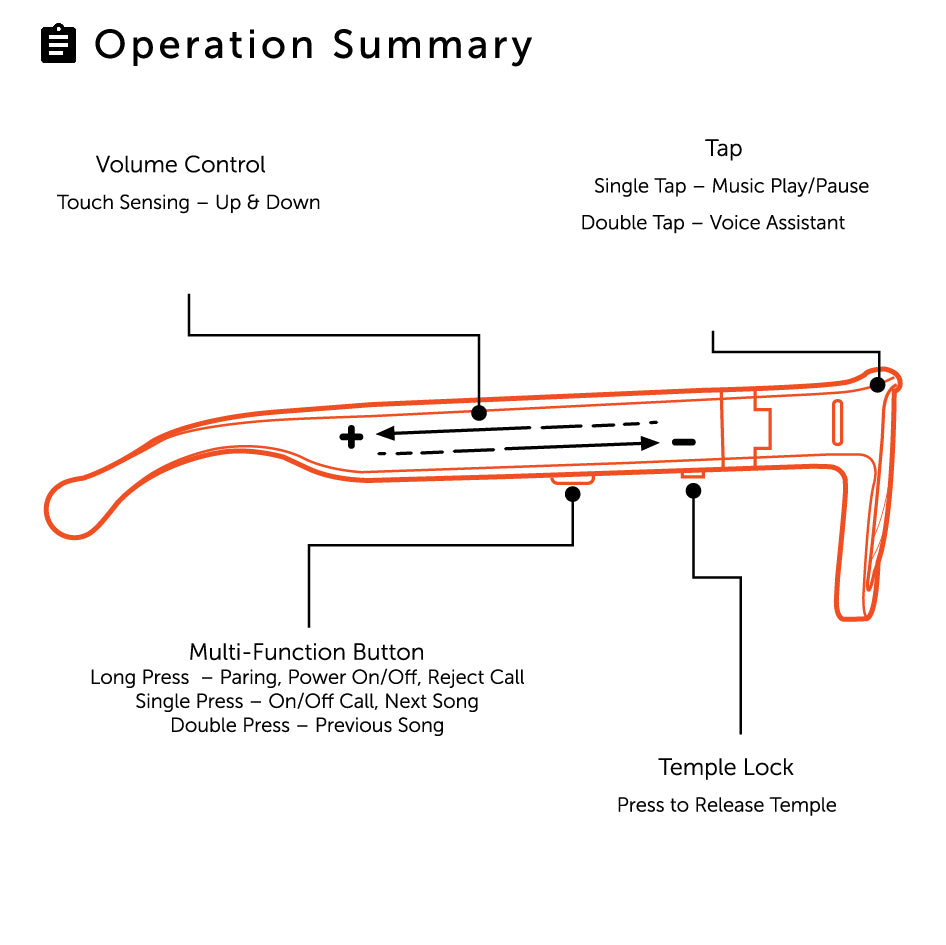
 AirGo, long press multi-function button for 2 seconds until PowerStatus voice prompt is heard, and it’s LED flashes in blue color
 . AirGo will reconnect to last paired phone automatically.
- To power off AirGo
 , long press Multi-function button for 3 seconds until “Power Off” voice prompt is heard, and its LED
 will turn off
-
AirGo will power off
automatically if it is not put on for 3 minutes.


- Nhấn giữ nút đa chức năng trong 5 giây để bật AirGo, đến khi đèn LED nhấp nháy đỏ/xanh dương.
 and Pairing voice prompt is heard.
- Turn on Bluetooth connectivity of your phone and put AirGo right next to your Phone
-
Open Bluetooth settings on your phone and select “Solos AirGo”.
-
AirGo’s LED will flash in blue color
 sau khi được ghép nối với điện thoại. Khi đó, kính đã sẵn sàng cho cuộc gọi và nghe nhạc. AirGo có thể ghép nối với tối đa 8 thiết bị.



-
To play music
 , single tap on the frame.
-
To pause music
 , single tap on the frame.
-
Khi đang phát nhạc, nhấn nhanh nút đa chức năng để chuyển sang bài tiếp theo.

-
Khi đang phát nhạc, nhấn nhanh nút đa chức năng hai lần liên tiếp để trở về bài trước.


-
To accept a phone call
, short press Multi-function button or slide backwards on right temple. -
To reject a phone call
 , long press Multi-function button for 1 second or slide forwards on right temple
-
To end a phone call
 , short press Multi-function button


- To accept the 2nd incoming phone call, short press Multi-function button. Current call will be ended.
- To reject the 2nd incoming phone call, long press Multi-function button for 1 second


-
To increase volume level
, slide backward  on right temple during phone call or listen to music.
-
To decrease volume level
 , slide forward
 on right temple during phone call or listen to music.
-
Mỗi lần vuốt về phía sau hoặc phía trước sẽ điều chỉnh âm lượng một mức.


- Double tap on the frame to enable voice assistant
 of your phone (iOS or Android). After your double tap, you will hear the Voice assistant beep tone. You can start the voice command.
- Double tap on the frame again to end voice assistant.


- Connect pogo pin connector of the charging cable to AirGo charging port.
- Plug USB connector
 of the charging cable to USB charger
 or laptop.
- AirGo’s LED shows in red color
 during charging and blue color
 after fully charged. AirGo will be automatically power off when its under charging.
-
Khi ngắt đầu nối pogo pin khỏi AirGo, kính sẽ tự bật nguồn và kết nối lại với điện thoại được ghép nối gần nhất.


- AirGo mobile app uses AirGo smart glasses to provide AI Care , AI Coach and many other features.
- AI Care hỗ trợ chăm sóc sức khỏe với các tính năng như theo dõi tư thế, bài tập tư thế/giãn cơ và nhắc nhở cá nhân (ví dụ: uống nước).
- AI Coach calculates and coaches your jogging activities.
- AirGo mobile app is available for both iOS and Android